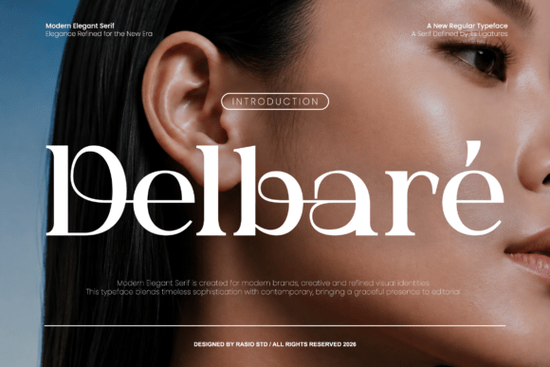
Delbare Font is a modern serif typeface that combines graceful ligatures with high-contrast strokes and balanced proportions. If you're searching for a typeface that adds a polished, custom-crafted look to logos, packaging, and editorial designs, this one deserves a close look. It's built specifically for display use, which means it shines in headlines, wordmarks, and branding projects where every letter matters.
What makes Delbare stand out from other serif fonts? And is it the right fit for your next project? Let's break it down.
What Does Delbare Font Look Like?
Delbare falls into the modern elegant serif category. The letterforms feature high-contrast thick and thin strokes, giving each character a refined, editorial quality. The ligatures are a highlight they connect certain letter pairs in ways that feel intentional and handcrafted, not generic.
Think of the kind of typeface you'd see on a luxury perfume box, a boutique hotel sign, or the masthead of a fashion magazine. That's the space Delbare occupies. It's sophisticated without being stuffy, and modern without losing the warmth that serif fonts naturally carry.
The proportions are carefully balanced, so text set in Delbare looks even and well-spaced. It reads cleanly at larger sizes, which is exactly what you want from a display serif.
Where Does This Typeface Work Best?
Delbare is designed for display-focused compositions. That means it's not really meant for body text in a 12-point document. Instead, it excels in projects where type is a visual centerpiece:
- Logo and wordmark design the ligatures give logos a custom feel without commissioning hand-lettering
- Editorial covers and layouts magazine covers, blog headers, book titles
- Packaging design product labels, box designs, shopping bags
- Promotional graphics sale banners, event posters, social media headers
- Branding systems business cards, letterheads, brand style guides
- Print-on-demand products mugs, tote bags, greeting cards with text-based designs
For print-on-demand sellers, a serif font like Delbare can help your text-based designs stand out in crowded marketplaces. Customers often gravitate toward elegant, readable typography on products like wedding invitations, motivational quote prints, and stationery.
Who Is Delbare a Good Fit For?
This typeface works well for a range of creative professionals and hobbyists:
- Freelance designers working on branding or packaging projects
- Small business owners creating their own marketing materials
- Print-on-demand sellers designing text-forward products
- Crafters making invitations, signs, or home décor with cutting machines
- Content creators who want polished typography for thumbnails and graphics
If your work calls for an elegant serif that feels current rather than traditional, Delbare fits that brief. It doesn't look dated or overly formal it has a clean, contemporary edge.
How Does Delbare Compare to Other Serif Fonts?
There are plenty of serif fonts available, so it's worth understanding where Delbare sits in the landscape. If you're exploring elegant serif options, Bremlin Italic offers a slanted, expressive take on serif design. For something with a different personality, Andore takes a more structured approach to serif letterforms.
What sets Delbare apart is its combination of ligatures and contrast. Some serif fonts have high contrast but feel stiff. Others have nice ligatures but lack visual punch. Delbare balances both qualities, which gives it versatility across different types of projects.
If you're building a type library for client work, pairing Delbarе with other serif options like Gulder Radeon or Asoga gives you a range of styles to pull from depending on the mood of each project.
What Should You Check Before Buying?
Before purchasing any font, including Delbare, here are a few things worth reviewing:
- License type make sure the license covers your intended use, whether that's personal projects, commercial client work, or print-on-demand products
- Character set check if the font includes the glyphs you need, such as accented characters for multiple languages or special punctuation
- File formats confirm the download includes the formats your software requires (OTF, TTF, WOFF, etc.)
- Software compatibility verify the font works in your preferred tools, whether that's Adobe Illustrator, Canva, Procreate, Cricut Design Space, or another platform
- Ligature support since ligatures are a key feature, make sure your design software can activate OpenType ligatures
How to Get the Most Out of Delbare
Once you've picked up the Delbare Font, keep these tips in mind:
- Use it at larger sizes. This is a display typeface, so it looks its best in headlines and titles not in paragraphs of small text.
- Turn on ligatures. In apps like Illustrator or InDesign, enable OpenType ligatures to access the custom letter connections that make Delbare special.
- Pair it carefully. Combine Delbare with a simple sans-serif for body text to create a clean contrast. A geometric sans works well alongside its elegant curves.
- Give it room to breathe. Generous letter-spacing and line-height help display serifs feel premium rather than cramped.
Quick Checklist Before You Start Your Next Project
- ✅ Identified where the font will be used (logo, packaging, POD, etc.)
- ✅ Confirmed the license matches your project type
- ✅ Tested the font in your design software
- ✅ Enabled ligatures and OpenType features
- ✅ Chose a complementary secondary font for body copy
- ✅ Set appropriate sizing for display use
Next step: If Delbare looks like a match for your current project, grab it and set up a quick test composition even just your brand name or a sample headline so you can see how the ligatures and letterforms work together before committing to a full design. Learn More
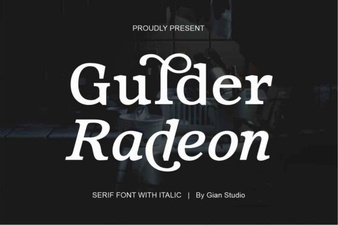 Gulder Radeon Font: Bold Typography for Modern Design
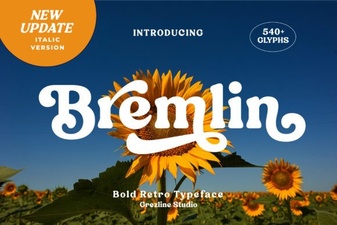 Bremlin Italic Serif Font - Elegant Classic Typeface for Design
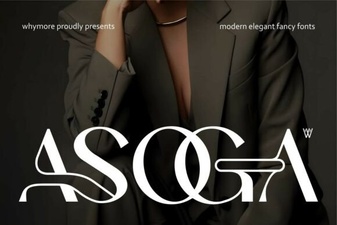 Asoga Font: Clean Modern Typeface for Creative Design Projects
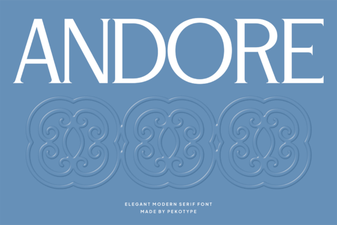 Andore Font: a Modern Typeface for Creative Design Projects
 Fourth Font - Bold Decorative Font for Creative Design Projects
 Robang Font: Creative Typography for Modern Design